Digital forms. Simply created.

Use drag & drop to design forms that perfectly fit your HR processes – without any code.

Description: Transform cumbersome paper processes into streamlined digital workflows. With our intuitive form builder, you can create everything you need in no time. This saves you time, reduces errors, and ensures that all information is complete and correct from the start.

Used daily by many companies

Create forms

Flexible, intuitive, and no programming knowledge required

With HR Autopilot, you can design custom forms to meet your exact requirements – from simple input fields to complex approval processes. Thanks to the user-friendly interface, you retain full control at all times and save valuable time in data collection.
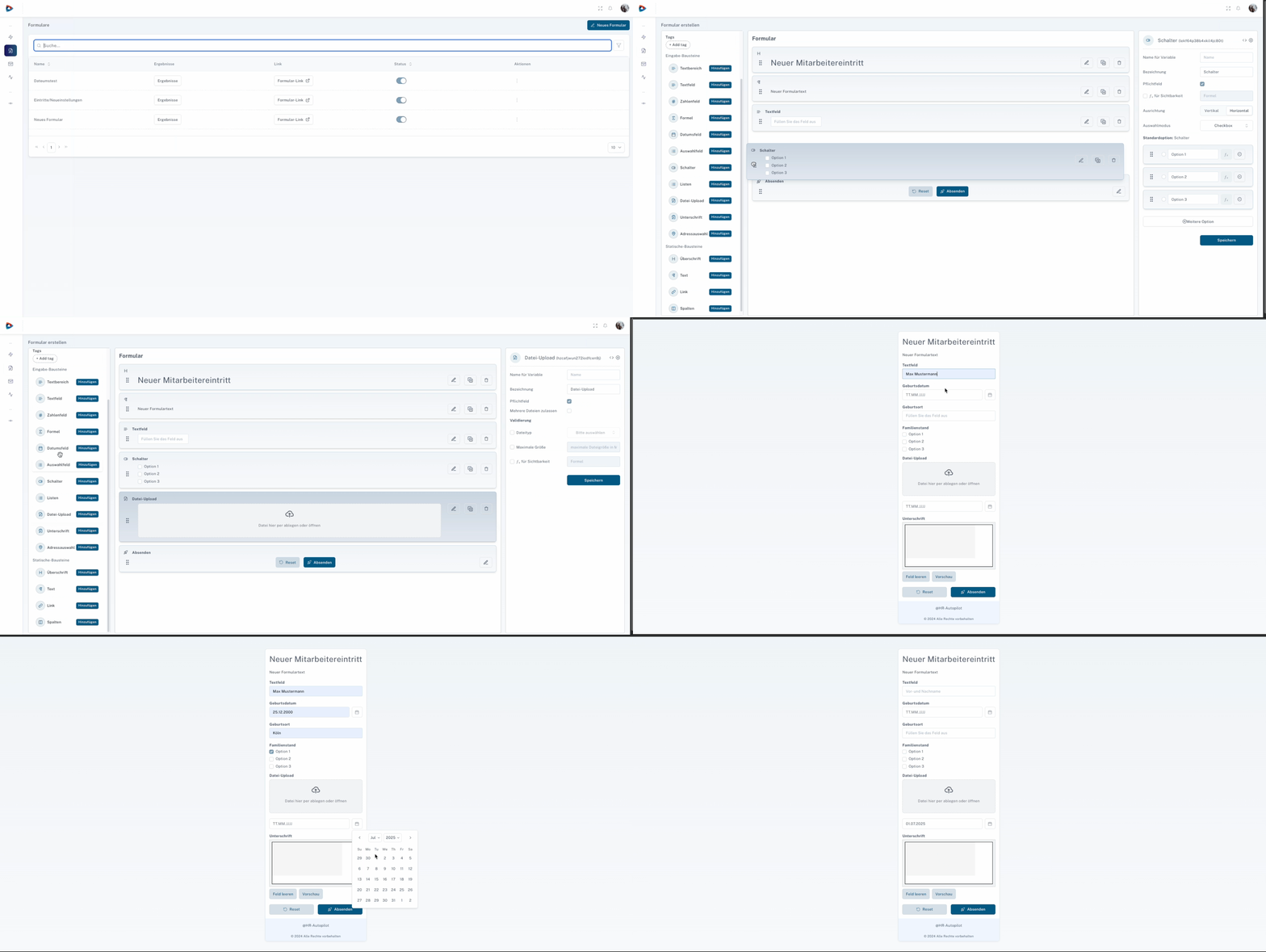
Step 1: Define Goal and Requirements

Before you begin, define the purpose of the form – whether onboarding, vacation requests, training registrations, or employee surveys. This ensures that all relevant information is collected and that it does not contain any unnecessary fields.

Use drag & drop to select from a variety of field types such as text, date, selection, calculation fields, or file upload. The fields can be arranged flexibly and divided into sections or columns so that your form remains clear and easy to complete.

With conditional visibility and decision paths, the form dynamically adapts to the user’s input. This ensures that only the relevant fields are displayed, making the process more efficient and much more pleasant for the employee.

Integrate your company logo, colors, and fonts so that the form seamlessly matches your corporate brand. Add legal notices, data protection consents, or footer texts to ensure compliance and trust.

Define what happens after submission: automatic notifications, reminders, or the direct transfer of data to connected HR and ERP systems. This saves manual rework and ensures that the information is processed immediately.

Before the form goes live, test it in various scenarios to check logic, validations, and integrations. After publication, you can customize and optimize it at any time – flexibly, without external support.

Collect all information in a structured and digital way. This avoids incomplete applications and ensures a clean data basis from the first click.

Automatic checks ensure the correctness of entries such as email addresses or IBANs. This saves manual corrections and immediately increases data quality.

The collected data automatically starts the correct workflows – without a manual intermediate step. This noticeably speeds up approvals, onboardings, and other HR processes.

“With HR Autopilot, we were able to significantly stabilize our payroll processes. Interfaces that were previously maintained manually now run automatically and securely – an enormous advantage for our HR and IT team”
Benedikt Köhler
Expert HR-IT systems
“With HR Autopilot, our recruiting is finally automated. Applicants are directly assigned to the correct position – faster, simpler, and without manual detours.”
Artour Ivantcho
Human Resources Team Lead
‘The automation between Personio and SAGE is a real win for us. We save time, reduce errors and finally have the transparency we need.’
Laura Stelzl
human resources
‘HR Autopilot is a real asset for us! Processes run much faster and are less prone to errors, and the data is secure and up to date. Our teams finally have more time for their actual tasks – less routine, more service and more enthusiasm for their work.’
Sina Niestroj
training manager

Testimonials

What our customers say about HR Autopilot

Our customers report significantly less effort, more efficient processes, and more time for what matters. Read for yourself how companies successfully use HR Autopilot and the results they achieve.

Personalized 1:1 consultation

Make an apppointment

See HR Autopilot in action!